
GDPR / CCPA - Member Profile Deletion
The Loyalty platform supports the ability to delete Member data from your system in order to satisfy California Consumer Privacy Act (CCPA) and General Data Protection Regulation (GDPR) requirements.
The platform provides four methods (described below) of removing a Member Profile, along with all related data referencing the Member, such as associated responses, Activities, Events, etc. These methods are:
-
Manual: A user logged into the Loyalty platform deletes a Member Profile.
-
Member API: A Member initiates the deletion of their own Profile.
-
Program API: An external system (such as the client's Customer Database Platform for example) initiates the deletion of a Member Profile.
-
Import: A user imports a file into Loyalty containing one or more Member Profiles to be deleted.
Note: Optionally, by means of a Program Setting, you can preserve selected types of response data when a Member Profile is deleted. Please see Program Setting Category - Member for more information.
Manual Member Deletion
The platform allows you to manually delete a Member from either the Member Profile screen or from the Member Details screen.
Member API: Member Deletion
To allow Members to delete their own Member Profiles via your website or mobile app, the Member API must be used. For more information, see the Member API technical documentation.
By default, you must first validate the Member’s password and access token before deleting their account. Optionally, you can configure a Program Setting to instead require a one-time-password (OTP) and access token, or just a valid access token by itself. All three methods are described below.
Current Password and Access Token
This method is the default setting. To delete a Member Profile using their current password (current_password) and a valid access token (access_token), use the following cURL command:
curl -X DELETE
     -H 'Accept: application/vnd.stellar-v1+json'
     -H 'Authorization: Bearer <access_token>'
     -F "current_password=<current_password>"
     <base_url>/api/profile
One-time Password and Access Token
If using the One-time Password (OTP) method, the most secure option is to send the Member the OTP via their email on record. By default, this OTP expires in 5 minutes. Optionally, you can configure the timing expiration by means of the Multi-Factor Authentication Program Setting. Within this Program Setting, change the value in the Direct MFA Code Validity in Minutes to the desired timing.
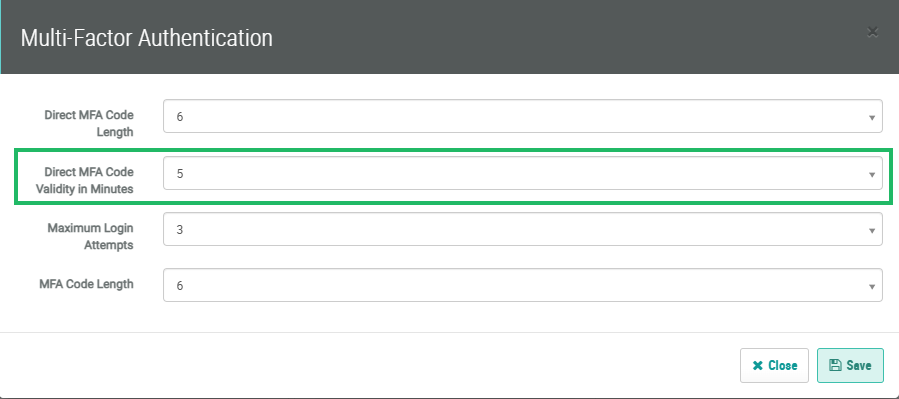
Note: Using the OTP code option requires email service, a valid access token, and to request that an extra environment variable be set: MFA_SECRET_ENCRYPTION_KEY.
To first request a new OTP code be sent to the Member’s email on record, use the following cURL command:
curl -X POST
     -H 'Accept: application/vnd.stellar-v1+json'
     -H 'Authorization: Bearer <access_token>'
     <base_url>/api/profile/otp
To then delete the Member Profile using the OTP code and a valid access token, use the following cURL command:
curl -X DELETE
     -H 'Accept: application/vnd.stellar-v1+json'
     -H 'Authorization: Bearer <access_token>'
     -F "code=<code>"
     <base_url>/api/profile
Access Token Only
This method is less secure, as it allows Member Profile deletion with just a valid access token.
To delete a Member Profile with just the valid access token, use the following cURL command:
curl -X DELETE
     -H 'Accept: application/vnd.stellar-v1+json'
     -H 'Authorization: Bearer <access_token>'
     <base_url>/api/profile
Program API: Member Deletion
The Program API allows an integrated external system to initiate the deletion of a Member Profile. For more information, see the Program API technical documentation.
Note: A username / password is required to access the Program API documentation. Please contact your Zeta Global team for assistance.
To delete a Member Profile via the Program API, you must send a API request using the DELETE method. The request must contain a valid Member identifier as a URL parameter. For example:
curl -X DELETE
     -H 'Accept: application/vnd.stellar-v1+json'
     -F "access_token=<access_token>"
     <base_url>/program/api/members/<id>
The options for identifying the Member are as follows:
-
Database ID (string)
-
Member ID (string)
-
Integration ID (string)
-
Card ID (string)
Import Member Deletion
The platform allows you to delete one or more Members by importing a file containing the Member identifiers that you want to delete.
Note: If you need assistance with importing a file, please reach out to your Zeta Global team.
For more information on importing a file, please see Create a Member Import Definition. When configuring an import with the intent of deleting Member Profiles, use the following settings:
-
Table: Person
-
Origin Settings: File has Column Header: Yes (using column headers is helpful for troubleshooting possible errors)
-
Action Settings: Action: Delete Records
-
Map & Transform: Select a key Member identifier such as Integration ID, Member ID, or email address.
Troubleshooting Import Member Deletion
Below are several troubleshooting tips when deleting Members via an import file.
-
The Import shows Status = Failed
Click the red Information icon. A pop-up message is displayed with an error message. The most typical error is “Missing headers in file.” Make sure the import file has the correct header row and retry the import.
-
Not all the records in the import file were successfully deleted.
Click the Download icon to export a file with the import result. In most cases, the deletion process skips Members because they don’t exist on the platform.
-
Deletion is processing extremely slowly or it is taking a long time to be completed.
Depending on the size of the imported file, it could take a few minutes (approximately 15 minutes) to process. If the import is still processing after refreshing the job history, please reach out to your Zeta Global team.
Note: Deleting Member Profiles is a complex process because many components are shared across different databases. For example, the process requires synchronization of MySQL child tables (around 50 tables), HBase tables (Members, Activity, Events, etc), and also Hive tables.
